A Home Office That's Kind to Your Back: Ergonomics by the Guidelines
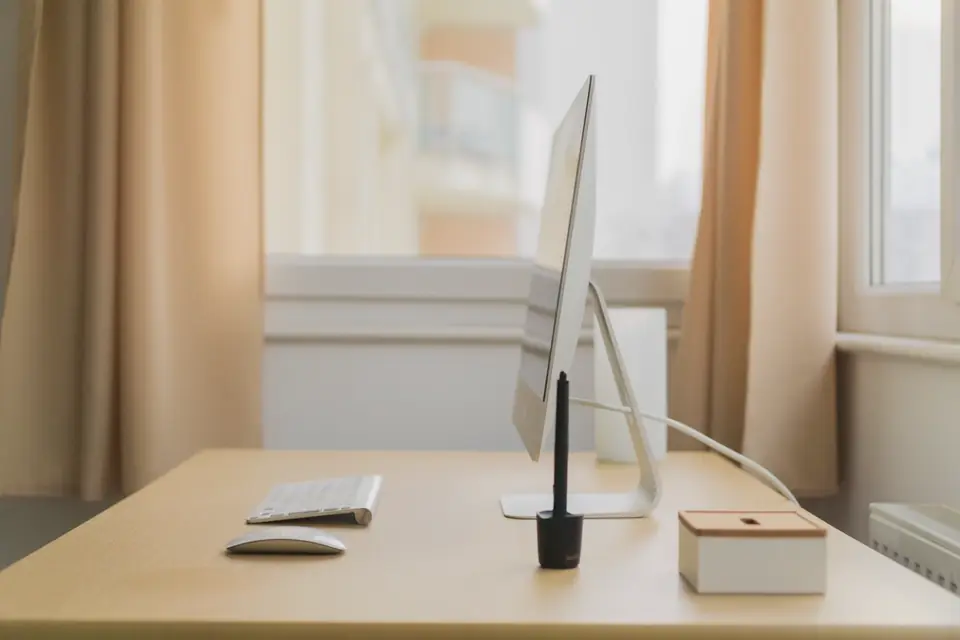
Working from a kitchen table or sofa for a few days is harmless. For months, it adds up. Workplace safety agencies have long published guidance on computer workstations; most of it translates directly to a spare room or a corner of the living room, often with little or no spending.
The principle: neutral postures and frequent change
Guidance from the US Occupational Safety and Health Administration (OSHA) and the UK Health and Safety Executive (HSE) aims for "neutral" postures: head balanced over the shoulders, upper arms relaxed by the sides, wrists straight, back supported, feet resting on a surface. Just as important is not holding any posture for too long. No single position is perfect for eight hours; moving and changing position regularly is part of good ergonomics.
Chair and seated posture
- Sit back in the chair so that its backrest supports the lower back. If the chair lacks lumbar support, a small cushion or rolled towel can help.
- Adjust seat height so that your feet are flat on the floor (or on a footrest) and your thighs are roughly horizontal.
- Leave a small gap between the front of the seat and the back of your knees.
- Armrests, if present, should not force your shoulders up or stop you getting close to the desk.
A dining chair can be made more workable with a cushion for height and a box or stack of books as a footrest. What matters is the relationship between seat, desk and screen.
Keyboard and mouse
- Place the keyboard directly in front of you, close enough that your elbows stay near your sides, bent at roughly a right angle or slightly more open.
- Keep wrists straight, not bent up, down or to the side. HSE guidance suggests leaving space in front of the keyboard to rest hands and wrists during pauses.
- Keep the mouse close to the keyboard, at the same level, so you do not reach.
Screen height and distance
- OSHA advises placing the monitor directly in front of you, about an arm's length away (roughly 50 to 100 cm, or 20 to 40 inches), with the top line of text at or slightly below eye level.
- People who wear varifocal or bifocal glasses often need the screen slightly lower to avoid tilting the head back.
- With two monitors used equally, place them side by side with the join in front of you; if one is used more, put it directly in front.
Laptops
A laptop forces a choice between a screen too low or a keyboard too high. For regular use, HSE recommends raising the laptop so that the screen is at the right height, for example on a stand or a stack of books, and using a separate keyboard and mouse. This is often the single most useful change for home workers.
Lighting, glare and eyes
- Position the screen at right angles to windows so that daylight comes from the side, not from behind the screen (which causes squinting) or behind you (which causes reflections).
- Use blinds and adjust screen brightness to match the room.
- Look away from the screen regularly. The "20-20-20" rule (every 20 minutes, look at something 20 feet away for 20 seconds) is widely recommended by eye care bodies to reduce eye strain; it is a reasonable habit, though the evidence behind the exact numbers is limited.
- If eye strain or headaches persist, have an eye test. In the UK, employers must pay for an eye test for display screen users who request one.
Sitting near a window also provides daylight that helps keep the body clock in step (see daylight and your body clock).
Breaks and movement
The HSE advises that short, frequent breaks are better than longer, infrequent ones, and that changing activity (taking a call standing, walking to make a drink) counts. The WHO's 2020 physical activity guidelines recommend limiting sedentary time and replacing it with physical activity of any intensity. Home working removes the walk to meetings and the commute, so deliberate movement matters more: a walk at lunchtime, standing for calls, or a few minutes of stretching between tasks.
Sit-stand desks: what the evidence shows
Sit-stand desks have become popular. A Cochrane review of workplace interventions to reduce sitting (Shrestha et al., 2018) found that sit-stand desks reduced sitting time at work by roughly 84 to 116 minutes a day in the short term, based on low-quality evidence; effects on health outcomes such as back pain were uncertain. Standing all day is not the goal either: prolonged standing has its own problems. If you use one, alternate between sitting and standing and keep the same principles for screen and keyboard height in both positions.
| Workstation figure | Value | Source |
|---|---|---|
| Screen distance | About an arm's length, roughly 50–100 cm (20–40 in) | OSHA |
| Top line of text | At or slightly below eye level | OSHA |
| Eye breaks ("20-20-20") | Every 20 minutes, look 20 feet away for 20 seconds | Eye care bodies (limited evidence for the exact numbers) |
| Sit-stand desks | Sitting at work cut by about 84–116 minutes a day, short term | Cochrane review, 2018 (low-quality evidence) |
If you have pain
Aches that come and go with long periods at the computer often improve with better setup and more movement. For low back pain, NICE guidance (NG59) emphasises staying active and continuing normal activities as far as possible. Persistent or worsening pain, numbness, tingling or weakness should be assessed by a doctor or physiotherapist. In the UK, employers have legal duties under the Display Screen Equipment Regulations 1992 that also apply to employees who regularly work at home, including assessing workstations.
A quick checklist
- Back supported, feet flat or on a footrest.
- Elbows by your sides, wrists straight, keyboard and mouse close.
- Screen an arm's length away, top at or slightly below eye level.
- Laptop raised, with a separate keyboard and mouse.
- Window to the side of the screen; no glare.
- Short, frequent breaks; move several times an hour.
This page is general information, not medical or occupational health advice. Persistent pain or numbness deserves a professional assessment.
Sources
- US Occupational Safety and Health Administration, Computer workstations eTool.
- UK Health and Safety Executive, Working safely with display screen equipment and Home working.
- Shrestha N et al. Workplace interventions for reducing sitting at work. Cochrane Database Syst Rev 2018.
- NICE, Low back pain and sciatica in over 16s (NG59).
- World Health Organization, WHO guidelines on physical activity and sedentary behaviour (2020).
 Healthy home
Indoor air quality at home
Cooking, wood stoves, VOCs, radon and the cheap fixes that actually work.
 Routines
A science-based morning routine
Wake time, daylight, movement and caffeine, plus viral tips without evidence.
 Sleep
SleepDaylight and your body clock
Bright days, dim evenings, dark nights: lighting a home for the circadian rhythm.